FAQ
How to clean a glass microplate
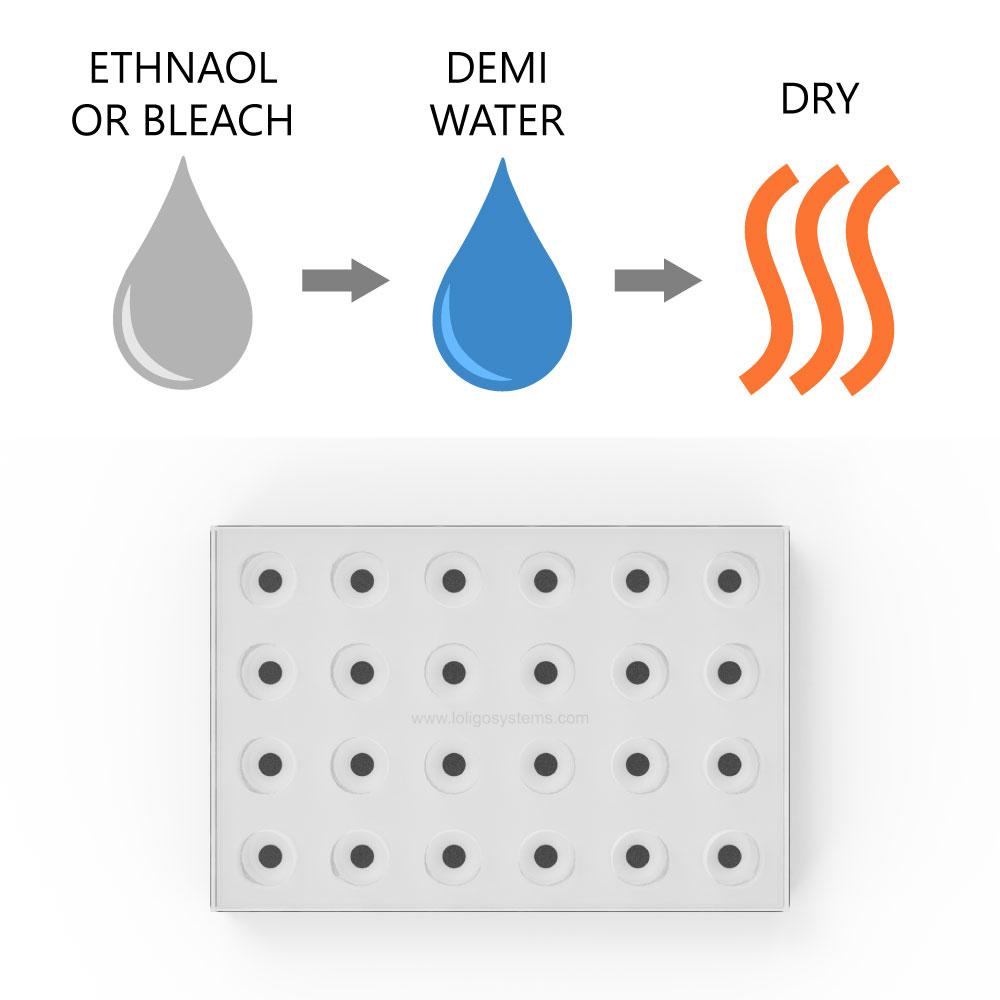
To clean the glass microplate, use ethanol (<70 % v/v), bleach, <3% hydrogen peroxide, or a mild soap solution, and then rinse with demi water and dry. If using ethanol to sterilize the spots/wells, then dry the plate thoroughly, at least 2 days at 50-60 °C in an oven, to ensure that all residues have left the sensor dye matrix.
It is recommended to perform a manual calibration after cleaning/sterilizing.
Step-by-Step Instructions using bleach
- Fill each well with 2-2.5% bleach, and ensure that there are no air bubbles in the wells.
- Leave for 10-20 Minutes.
- Empty the wells, and rinse each well thoroughly with demi water.
- Let the wells dry overnight in the dark.
- Perform a manual calibration before starting a new experiment.
Link
MicroResp - How to get the oxygen consumption rate per volume
To get oxygen consumption rates per volume rather than per well (or organism) you turn off the “Organisms per well” in the settings section of the Experiment tab, as shown in the picture below, the software will then calculate the MO2 based on the Well volume you set in the same section.

To select the preferred MO2 unit, go to the Settings tab in the Analysis section, which is shown in the image below, here you find the new MO2 units per volume by clicking on the dropdown menu and selecting your preferred unit.

Link
MicroResp - Error "No splitter found - please connect splitter with SDR"
The pop-up with the error message "No splitter found - please connect splitter with SDR" typically comes from a missing driver.
For most PCs, this driver is distributed alongside Windows updates, but in certain cases it is missing. When the driver is missing, the USB splitter cable is not recognized by Windows resulting in the error message.
To fix it, please do the following steps:
- Download the driver from this link
- Unzip and install the driver
- Restart your PC
- Try to connect again via MicroResp
Link
Sealing film for well plates and O2 diffusion
One important thing when measuring closed respirometry is to avoid gas exchange with the surroundings. This is especially important in the case of respirometry experiments in small volumes, such as our well plates.
For this reason, our well plates are made from impermeable borosilicate glass material, which prevents transfer of dissolved gases in/out of the well walls, unlike well plates made of plastic materials, which can act as a sink or source for O2 and CO2.
The sealing film we provide with the system has been chosen due to its very low gas permeability and thus minimal O2 diffusion across the film, i.e., near zero net flux.
Since the film is made of polyester material, O2 diffusion cannot be completely avoided. To demonstrate the limited influence and size of this, we have evaluated the O2 ingress and flux over the sealing film, from air saturated and temperature-controlled water (28°C) continuously flushed/pumped over the sealing film and well plate using the water bath for microplates. The ingress/flux was evaluated in the glass microplate with 1,700 µL wells, to investigate it in the well plate with the largest surface area of the sealing film.
Over 2 days, the O2 in [% air saturation] increased by less than one percentage point:

O2 diffusion into each of the N2 flushed wells during this period was only 2.8 nmol·h-1 (SD = 0.38 nmol·h-1, n=15).
O2 penetration was similarly investigated from atmospheric air to N2 flushed wells over a period of 7 days, and here a similar O2 diffusion was demonstrated, with an overall overage of 2.2 nmol·h-1 (n=23).
This level of O2 penetration would be insignificant in most recommended experimental studies carried out with the microplate system.
Please note that these numbers are intended to demonstrate the limited O2 penetration through the sealing film. The sealing film does not come with a technical data sheet on O2 diffusion. If you intend to use information on the diffusion for scientific calculations, you should perform similar investigations using your own experimental setup.
Link